About the Structure
To ensure smooth navigation and a clear understanding of how this project is organized, let's take a tour of its directory structure. Each directory serves a specific purpose, contributing to the overall efficiency and maintainability of our Ansible-driven central server administration solution.
.
├── group_vars
├── host_vars
├── inventory
├── roles
├── playbook_1.yaml
├── playbook_2.yaml
├── playbook_3.yaml
└── playbook_2.yaml
...
└── playbook_N.yaml
-
inventory: This is where we define our inventory hosts and groups. It's the foundation of targeted server management.
-
playbooks: These YAML files outline the tasks and configurations we want to apply to our servers. They are NOT saved in a dedicated directory and can be found directly at the root path
-
roles: In this directory, we've structured reusable roles. Each role encapsulates specific functionalities, promoting modularity and reusability across different playbooks. We well see more details on the corresponding structure in the next chapter
-
host_vars: Here we define variables tailored to individual servers. These variables hold unique configurations, allowing us to customize settings for specific hosts. This separation simplifies management and keeps our playbook structure organized. Please be aware of, that the filename has to be identically to the host-name in the inventory
-
group_vars: Here we define YAML files named after host groups. These files contain variables that apply to all hosts within their respective groups, allowing us to efficiently manage configurations for clusters of servers.
roles
The directory of a certain role is (or at least can be) organized in a structure of subdirectories. This has the big advantage, that ansible knows this structure very well and finds all the related paths by default.
Let's have an exemplary look at two of our roles:
.
├── backups
│   ├── meta
│   ├── tasks
│   ├── templates
│   └── vars
├── docker_host
│   ├── files
│   ├── tasks
│   └── vars
...
You'll notice 5 different directories:
-
tasks: This directory holds YAML files outlining the main tasks and instructions for the role. (default: main.yaml)
-
vars: Specific variables for the role can be defined in this directory, further enhancing. (default: main.yaml)
-
files: This is the home for static files that the role might need to copy to the managed servers.
-
templates: If the role requires dynamic file generation, the corresponding Jinja2 templates are stored here.
-
meta: Contains dependencies.
tasks and vars can be used by simply adding file with the default name main.yaml. Ansible will find those automatically. I case of tasks we applied the setup to describe different (maybe subject related) blocks of tasks within dedicated files, which are than included within main.yaml.
Please note that the information provided here only scratches the surface in terms of content. Just have a look at the official documentation for more details.
host_vars
The blank host_vars directory is a conscious choice driven by security. It refrains from containing data to prevent versioning sensitive information. Instead, our workflow involves encrypted storage of sensitive variables, inserted as needed during local project initialization.
The following visualisation documents the workflow how we handle the host variables and indicates how to get them:
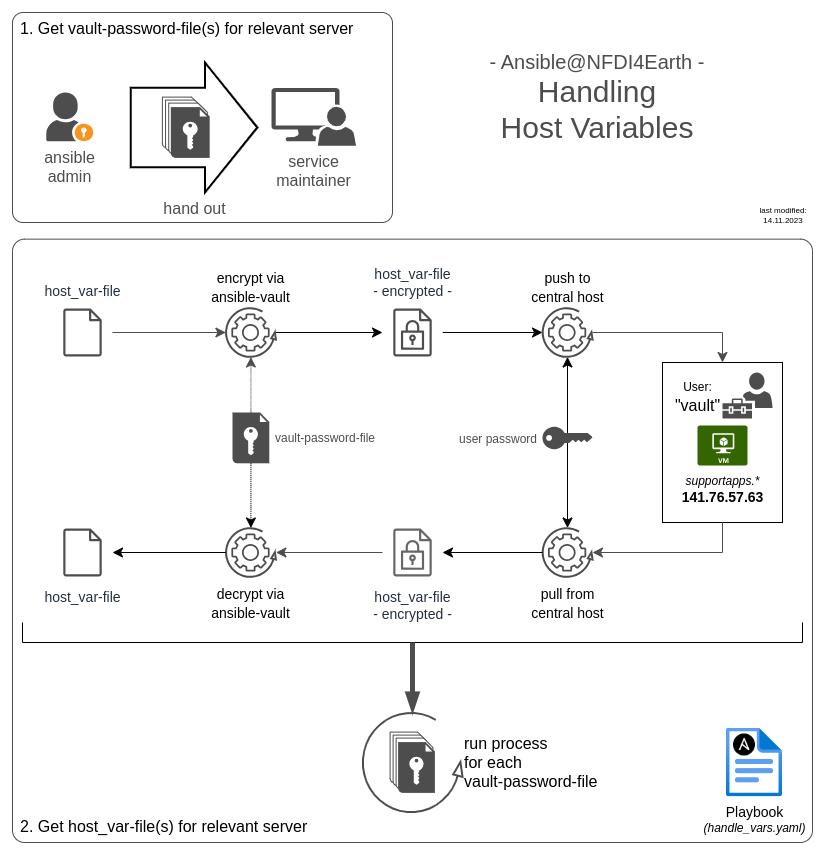
So you have to:
-
get all relevant vault-password-file(s) + the "vault" user password from the ansible admin
-
save vault-password-file(s) at
./vault/secrets/ -
run
ansible-playbook handle_vars.yaml -kto get a local encrypted copy of the host_vars related to the vault-password-files, that you've received -
add ssh-key for
vault@supportapps_prod -
select what you want to do: pull, encrypt, decrypt or pull host variable files